What is Instant File Initialization? SQL DBA Interview Q & A

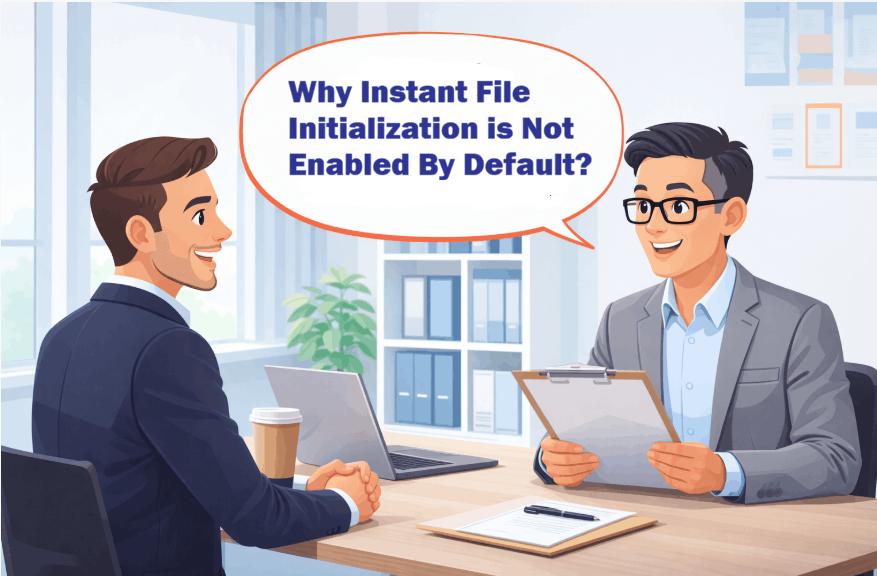
Hi There! We are going to discuss What is Instant File Initialization. The idea here is to explain you what does Instant File Initialization (IFI) mean and how it works. How far you should explain to an Interviewer and what has changed in SQL 2022.

What is Instant File Initialization

What is Instant File Initialization?

It is basically a Windows Operating System (OS) feature. Whenever SQL Server creates or expands a data or log file, OS validates the disk by writing zeros to the files. This process is known as Zeroing process.

The internal steps are as follows:
  • Allocate the space on disk
  • Writes zeros to the entire allocated portion
  • Then make it available for use

It is a single threaded process and hence for large files the delay is quite visible. Instant File Initialization allows SQL Server to allocate space for data files without zeroing out the disk space first and hence reduces the wait time. Basically it skips the zeroing process.

When you are answering in an interview this much should suffice. Continue to read for more knowledge and to be able to answer any follow up questions.

Does IFI applies to Log File?

In the past, transaction log files could not use instant file initialization. However, starting with SQL Server 2022 (16.x) — across all editions — and in Azure SQL Database and Azure SQL Managed Instance, transaction log autogrowth can now use instant file initialization for growth events up to 64 MB.

By default, new databases are configured with a 64 MB autogrowth size, which means they automatically benefit from this improvement.

If the transaction log grows by more than 64 MB at a time, instant file initialization will not apply, and the growth will take longer as the space must be zero-initialized.

What are the database Activities benefited by IFI?

  • Creating a New Database
  • Adding data or log file to an existing database
  • Increasing the existing file size manually or due to auto growth option
  • Restoring a database from backup file

How IFI works if Transparent Data Encryption (TDE) is Enabled?

If TDE is enabled for a database, IFI stops working for datafile however it is allowed for transaction log growth, because of how the transaction log file grows, and the fact that the transaction log is written into in a serial fashion.

How IFI works in SQL Azure and Managed Instance?

  • In Azure SQL Database and Azure SQL Managed Instance, transaction log autogrowth events up to 64 MB can benefit from instant file initialization.
  • Instant file initialization is automatically used in the General Purpose and Business Critical tiers of Azure SQL Database and Azure SQL Managed Instance. It helps improve the growth of transaction log files.
  • Instant file initialization isn’t configurable in Azure SQL Database and Azure SQL Managed Instance.

What kind of Environments will be benefited by IFI?

  • High-availability systems
  • Large databases
  • Systems with frequent restores
  • Systems experiencing auto-growth delays

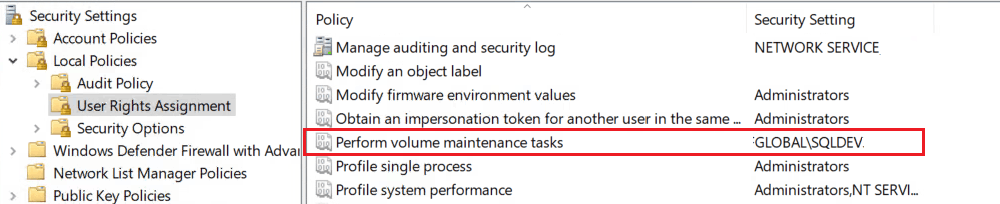
There are very few reasons not to enable it. Ideally it should be part of SQL server build process.

You may also like to check the following:

Junior SQL Server DBA Interview Questions and Answers

SQL DBA Interview Question Answers -Part2

Junior SQL DBA Interview Questions Answers -Part3

Junior SQL DBA Interview Question Answers: Part 4


Please spread the word:

{ Add a Comment }

Fix XTP Configuration Is Invalid Error In Always On

Hello, this article is going to be part2 of How To Fix: XTP Configuration Is Invalid where we have learnt about the SCOM alert, what is XTP in SQL Server and how to fix the same in stand alone SQL Instance.

Here we’ll learn about the steps to fix XTP Configuration is invalid error in Always On SQL Instance. Hence I would like you to first go through the first article.

Steps to Fix Configuration Is Invalid Error In Always On

  1. Calculate Resource Pool Memory
  2. Create a resource pool
  3. Bind the database to the pool
  4. Bring the database offline and then online
  5. Confirm the Binding

Now you may be thinking, well these are exactly the same steps for stand alone SQL Instance. Yes, you’re right, however in case of Always On you need to perform few extra steps for the point no. 4.

I have already explained how to calculate resource pool memory in the first article Link. Here I’ll start from point no.2

2. Create a resource pool

In case of Always On you have to create the resource pool in all the replicas.
Execute the below query on each replica.

 CREATE RESOURCE POOL PoolName  --Provide the pool name maintaining Organization's naming convention
  WITH
   (
     MIN_MEMORY_PERCENT = 63,  --Adjust as needed/calculated 
     MAX_MEMORY_PERCENT = 63   --Often set to the same value as MIN_MEMORY_PERCENT for Predictability
   )
 GO
 ALTER RESOURCE GOVERNOR RECONFIGURE;

e.g. XTP Configuration is Invalid

3. Bind the database to the pool:

Execute the below query on all the Replicas

EXEC  sys.sp_xtp_bind_db_resource_pool YourDatabaseName, 'PoolName';

e.g.XTP Configuration is Invalid

4. Bring the database offline and then online:

This is a bit tricky in case of Always On setup. You need to remove the db from Availability Group before you can take the db offline.

Following are the steps:

  • Remove the database from Availability Group
  • Take the database Offline and then Online on Primary Replica
  • Readd the database back to Availability Group
  • Failover the Availability Group to each of the replicas and Failback to the original Primary Replica.
5. Confirm the Binding:

This also needs to be executed on all the Replicas

SELECT d.database_id, d.name, d.resource_pool_id   
FROM sys.databases d WHERE name='SQLGeeksPro' --Change database name
GO

Example Result Set:

XTP Configuration is Invalid in Always On

As you can observe there is an associated resource_pool_id for the example database “SQLGeeksPro”.

Hope this helps. Please feel free to leave a comment.

Please spread the word:

{ Add a Comment }

What Does SQL DBA Actually Do?

Hi There! Whether you are a student, aspiring data professional, or thinking to transform to a DBA role and wondering “What Does SQL DBA Actually Do”, you are not alone. The title Database Administrator (DBA) might sound mysterious, but it’s one of the most critical roles in IT .

What Does SQL DBA Actually Do

This guide breaks down what a SQL Server DBA really does, the tools they use and additional responsibilities as they grow in their carrier.

There are basically two type of DBA jobs in the IT industry.

Application DBA/Logical DBA — Works closely with Application Developers. Designs schema, tables, indexes, and relationships according to application needs. Require Strong SQL coding skills.

Production/Infrastructure DBA — Focuses on database operations, uptime, performance, and recovery in the production environment. Demands Strong system administration and database configuration skills.

To give you one real time scenario to understand a basic difference between the two:

When a Query is running slow, Production DBA will identify the exact slow running query and provide the query(execution) plan to App DBA. App DBA will analyze the plan and fix the query.

In some organizations the responsibilities may overlap depending upon the job requirement.

Key Responsibilities of a SQL Server DBA:

Area Application DBA Production DBA
Database Backup & Recovery Is not Responsible Ensure all database servers are backed up in alignment with Recovery Point Objective (RPO) and regularly
tests restores of the backup files to make sure Recovery Time Objective (RTO) can be met.
Database Design Designs schema, tables, indexes, and relationships according to application needs. Ensures design aligns with operational standards and performance requirements.
SQL & Performance Tunes SQL queries, stored procedures, and application-side performance. Tunes system-level performance—memory, I/O, CPU, and indexing strategies.
Development Support Works with developers during development and testing phases. Supports deployments, migrations, and production rollouts.
Maintenance Less involved in backups and system maintenance. Handles patching, upgrades, Index maintenance and monitoring.
Security & Access Defines roles and privileges for applications. Manages overall database security, auditing, and compliance.
Troubleshooting Fixes app-specific data or query issues. Diagnoses system-level issues, server crashes, corruption, and performance bottlenecks.

Essential Tools/Functionalities Every SQL Server DBA Should Know:

Tool Description
SQL Server Management Studio (SSMS) Core interface for managing SQL databases.
Azure Data Studio Modern, cross-platform alternative with notebooks.
SQL Server Extended Events For tracing and debugging query performance.
Dynamic Management Views (DMVs) Provides insight into SQL Server to assist with troubleshooting and monitoring.
SQL Agent Service Automates scheduled jobs and maintenance tasks.
PowerShell / dbatools For automating DBA workflows.
Query Store Simplifies the process of identifying and resolving Query performance issues by providing insights into query plan.
Monitoring Tool like Redgate SQL Toolbelt Professional suite for monitoring, comparison, and deployments.

Now as you grow in your DBA carrier, your role will not be limited to only technical work. I have tried to put few more critical responsibilities based on my experience.

Automation: Analyze repetitive tasks and check what and how far a task can be automated. Work with automation team, provide suggestions etc.

Incident reduction: Senior DBA/leads will work on analyzing ticket dumps and work on reducing repetitive incidents on same SQL Instance.

RCA (Root Cause Analysis) : On P1/P2 incidents, Leads/SME (Subject Matter Specialist) will work with Problem Management Team to document the RCA.

SOP (Standard Operating Procedure): You’ll be responsible for preparing SOPs for junior resources or on particular process to be followed for repetitive activities. e.g. Steps to Follow from database end during OS patching, Database Decommission, SQL Instance Provision/Decommission etc.

Customer Escalations: Handling customer escalations will be one of your prime responsibilities.

Mentoring Junior DBAs: Guiding Junior DBAs and providing necessary technical/process related trainings. Making proper plan for newly onboarded team member to bring him/her up to the speed etc.

Planning Major Activities: You will need to prepare Runbooks for major activities like DR (Disaster Recovery Drill), SQL Server upgrades etc.

Hope now you have got an overall idea about what Does a SQL DBA Actually Do. Please feel free to comment in case you want me to add any further responsivities.

You can also refer the following links:

What is SQL Server

Understanding SQL Server Versions and Editions

The Complete Guide to SQL Server System Databases


Please spread the word:

{ Add a Comment }

How To Fix: XTP Configuration Is Invalid

Hi There! In this article we are going to discuss about the SCOM Alert “MSSQL On Windows: XTP Configuration Is Invalid”. At first let’s see the alert description:

“XTP configuration for database “DatabaseName” on SQL Server instance “SQLInstance Name”, computer “ServerName” is not set according to the best practices. Database with memory-optimized tables should be bound to a dedicated resource pool.”

This alert points to issues with the configuration of In-Memory OLTP (XTP) features in SQL Server, which can impact database performance and reliability. As per the alert description, the database has memory-optimized tables and there is no dedicated resource pool. That is why you are not going to find out any error in SQL Error log related to this.

What is XTP in SQL Server?

XTP stands for Extreme Transaction Processing, an informal name to describe the In-Memory OLTP feature that powers memory-optimized tables. It is to boost transaction throughput by minimizing disk I/O and maximizing data access speed.

When you enable and create memory-optimized tables, SQL Server requires specific settings and prerequisites to ensure the XTP engine runs smoothly.

What is the Impact on SQL Server?
  • SQL Engine will allocate memory to memory-optimized tables from the default pool. This leads to uncontrolled memory consumption, which can cause overall memory pressure.
  • Without proper resource pools, SQL Server cannot isolate memory for In-Memory OLTP.
  • Result: potential server performance degradation, query slowdowns, or even crashes causing downtime.
How to Fix the XTP Configuration is Invalid Error?
  • Calculate Resource Pool Memory
  • Create a resource pool
  • Bind the database to the pool
  • Bring the database offline and then online

Well it is not that simple as it sounds. You need to calculate the memory percentage to allocate to the resource pool.

First of all you need to know the amount of memory needed for the memory optimized tables in the database. You can go through the Microsoft documentation Estimate Memory Requirements for Memory-Optimized Tables for the same.

Ideally this number should be provided by the app team to production DBA to do the rest of the configuration in SQL Server. However in some cases your app team may not be able to help with the information. Then you need to proceed as per the size in pre prod environment by monitoring the growth for couple of weeks.

Calculate Resource Pool Memory:

percentNeeded =  memoryNeeded / memoryCommitted * availablePercent

  • memoryNeeded: Amount of memory needed for memory optimized tables
  • memoryCommitted:  SQL Server Max Memory
  • availablePercent: Refer the below table:
Target Committed Memory Percent available for in-memory tables
<= 8 GB 70%
<= 16 GB 75%
<= 32 GB 80%
<= 96 GB 85%
>96 GB 90%

For example, If

  • memoryNeeded = 16 GB
  • memoryCommitted = 32 GB
  • then availablePercent (considering the table) = 80%

Hence by plugging real numbers

percentNeeded = 16 / (32 * .8) = 16/25.6 =.625 

Converting the result to percentage .625 * 100 = 62.5

percentNeeded = 62.5% rounding of to 63%

Create a resource pool:

Execute the following script to create a resource pool:

 CREATE RESOURCE POOL PoolName  --Provide the pool name maintaining Organization's naming convention
  WITH
   (
     MIN_MEMORY_PERCENT = 63,  --Adjust as needed/calculated 
     MAX_MEMORY_PERCENT = 63   --Often set to the same value as MIN_MEMORY_PERCENT for Predictability
   )
 GO
 ALTER RESOURCE GOVERNOR RECONFIGURE;

e.g. XTP Configuration is Invalid

Just to clarify, resource pool is created at SQL Instance level and not on database.

Bind the database to the pool:
EXEC  sys.sp_xtp_bind_db_resource_pool YourDatabaseName, 'PoolName';

e.g.XTP Configuration is Invalid

Next and last step is to take the database offline and than bring it online as can be seen in the messages once you bind the database to the resource pool.

Hope this helps. For Always ON SQL Instance there are few extra steps needs to be followed which we’ll discuss in the next blog Fix XTP Configuration Is Invalid Error In Always On

You may also like to go through the below:

Query to List SQL Database Role Owner Across All Databases

Query To List SQL Database Role Owner

SQL Server FORMAT Function Quick Guide

Please spread the word:

{ Add a Comment }

Query to List SQL Database Role Owner Across All Databases

Hello, Today we I am going to provide you with a query to List SQL Database Role Owner Across All Databases. In the article Query To List SQL Database Role Owner we have seen how to List The Database Role Owner for a single Database.

This query will be nice to have in the repository in case you want a audit report for all databases on a SQL Instance.

DECLARE @dbname VARCHAR(50)
DECLARE @statement NVARCHAR(MAX)
CREATE TABLE #databaseRoleOwner
(
        [DatabaseName] sysname,
	[RoleName] varchar(100),
	[RoleOwner] varchar(100)
);

DECLARE db_cursor CURSOR 
LOCAL FAST_FORWARD
FOR  
SELECT name
FROM master.sys.databases
WHERE  state_desc='online' 
OPEN db_cursor  
FETCH NEXT FROM db_cursor INTO @dbname  
WHILE @@FETCH_STATUS = 0  
BEGIN
SELECT @statement = 'use ['+@dbname +'];'+ 'SELECT dbname=db_name(db_id()),
    name AS RoleName,
    USER_NAME(owning_principal_id) AS RoleOwner
FROM
    sys.database_principals
WHERE
    type = ''R'' and name NOT IN (''public'', ''db_owner'', ''db_accessadmin'',''db_securityadmin'', ''db_ddladmin'',''db_backupoperator'',''db_datareader'',
	''db_datawriter'',''db_denydatareader'',''db_denydatawriter'')'

INSERT INTO #databaseRoleOwner ([DatabaseName],[RoleName],[RoleOwner])
EXEC  sp_executesql @statement
 
FETCH NEXT FROM db_cursor INTO @dbname  
END  
CLOSE db_cursor  
DEALLOCATE db_cursor

SELECT * FROM #databaseRoleOwner
GO
 -- DROP TABLE #databaseRoleOwner

Example Result set:

List SQL Database Role Owner


Let me know your thoughts by leaving comments below. The following scripts are also useful for day to day DBA life.

Query To List All Orphaned Logins In SQL Server

List All Database Users With Permissions

Script To List SQL Agent Jobs and Schedules

SQL Server Select Data Between Two Dates


Please spread the word:

{ Add a Comment }

Query To List SQL Database Role Owner

Hi There! Today I am going to provide you with a simple Query To List SQL Database Role Owner. Understanding who owns a role helps database administrators (DBAs) track permissions and audit role management effectively.

Where Do you See the Database Role Owner?

In SSMS (SQL Server Management Studio), Expand the Database > Security > Roles > Database Roles > Right Click on the Role > Properties

Query To List Database Role Owner

Possible Scenarios:

These are few possible cases when you may need to to list out the Database Role Owners.

  • Review current role ownership across multiple databases.
  • Ensure roles are owned by intended users or service accounts.
  • Document security settings for compliance.

Query To List SQL Database Roles and the Owner:

USE SQLGeeksPro 
GO
SELECT Dbname=DB_NAME(DB_ID()),
       name AS RoleName,
       USER_NAME(owning_principal_id) AS RoleOwner
FROM 
       sys.database_principals
WHWRE 
       Type='R'

Example Result Set:

Query to List SQL Database Role Owner

If you want to run the script across all databases in a single SQL Instance refer Query to List SQL Database Role Owner Across All Databases

Please let me know if that helps by leaving your comment below.

Please spread the word:

{ Add a Comment }

SQL Server FORMAT Function Quick Guide

Hi There! This is going to be a quick guide for SQL Server FORMAT Function. Formatting data in SQL Server often plays a crucial role in reporting, data presentation, and user interfaces.

Here we’ll walk you through few examples of the FORMAT() function in SQL Server.

Table of Contents
  1. What is the FORMAT() Function?
  2. Syntax of FORMAT()
  3. Formatting Dates and Times
  4. Formatting Numbers
  5. Specifying Culture (Locale)
  6. Conclusion
1. What is the FORMAT() Function?

Introduced in SQL Server 2012, the FORMAT() function is used to return a value formatted with the specified format and culture (locale).

It is particularly useful when you need to:

  • Display results in a user-friendly format
  • Output locale-specific formats
  • Customize currency or date formats
2. Syntax of FORMAT()

It has a very simple Syntax

FORMAT( value , format [ , culture ] )

Now let’s understand the parameters:

Value: It is the value on which you want to apply the formatting. Not to mention, it should be one of the valid data types.

Format: Specify the format in which you require the output. (for example, "MM/DD/YYYY"). It does not support Composite formatting.  This parameter should contain a valid .NET format string in the NVARCHAR data type

Culture: It is an optional parameter. By default, SQL Server uses the current session language. This language is set either implicitly, or explicitly by using the SET LANGUAGE statement.

Culture accepts any .NET Framework supported culture as an argument or else it raises an error.

3. Formatting Dates and Times

You can use FORMAT() to format date and time values using .NET date and time format strings.

Example 1: Formatting current Date in ‘yyyy-mm-dd’ or ‘dd-mm-yyyy’ format

SELECT GETDATE() AS DefaultDateFormat
GO
SELECT FORMAT(GETDATE(),'yyyy-MM-dd') AS FormattedDate
GO
SELECT FORMAT(GETDATE(),'dd-MM-yyyy') AS FormattedDate
GO

The result set is as follows:

In this case you can observe that the default date format of GETDATE() function is “yyyy-mm-dd hh:mm:ss.mmm” and we used the FORMAT() function to display it in “yyyy-mm-dd” and “dd-mm-yyyy” format.

Example 2: Display/Extract desired format from GETDATE()
SELECT FORMAT(GETDATE(),'d') AS ShortDate
GO
SELECT FORMAT(GETDATE(),'D') AS LongDate
GO
SELECT FORMAT(GETDATE(),'m') AS MonthDate
GO
SELECT FORMAT(GETDATE(),'g') AS [MM/DD/YYYY hh:mm AM/PM]
GO
SELECT FORMAT(GETDATE(),'G') AS [MM/DD/YYYY hh:mm:ss AM/PM]
GO

You can observe the differences in result set for each parameter:

Format Function

4. Formatting Numbers:

You can apply numeric format strings for currency, percentages, and custom number formats

Example1: Formatting Numbers

SELECT FORMAT(1234.56, '#,##0.00') AS [Comma Separated Formatted Number];
GO
SELECT FORMAT(1234.56, '#,##0.000') AS [Comma Separated Formatted Number With Additional Decimal Place];
GO
SELECT FORMAT(123456789, '#,#') AS [Thousand Separator];
GO
SELECT FORMAT(123456789.566, '#,#.##') AS [Thousand Separator with rounded to a specified number of decimal places]
GO
SELECT FORMAT(123456789, '##-##-#####') AS [Dash Separator];
GO

Notice the differences in output. Column names are self explanatory.

Example 2: Formatting Currency

SELECT FORMAT(1.5, 'c', 'hi-in') AS [Indian Currency / Rupee]
GO
SELECT FORMAT(1.5, 'c', 'en-US') AS [US Currency / Dollar]
GO
SELECT FORMAT(1.5, 'c', 'en-gb') AS [Great Britain Currency / Pound]
GO
SELECT FORMAT(1.5, 'c', 'de-de') AS [German Currency / Euro]
GO
SELECT FORMAT(1.5, 'c', 'ru-ru') AS [Russian Currency / Ruble]
GO
SELECT FORMAT(1.5, 'c', 'gl-es') AS [Spain Currency / Euro]
GO

The result set with self explanatory column names:

Format Funtion

Example 3: Percentage Formatting
SELECT FORMAT(0.756, 'P') AS [Percentage]
GO
SELECT FORMAT(0.756, 'P0') AS [WholeNumberPercentage]
GO
SELECT FORMAT(0.756, 'P3') AS [ThreeDecimalsPercentage]
GO
SELECT FORMAT(0.756, 'P4') AS [FourDecimalsPercentage]
GO
SELECT FORMAT((47.0/48.0), '#,##.0%') AS [Percentage Rounded to One Decimal Place]
GO
SELECT FORMAT((47.0/48.0), '#,##.##%') AS [Percentage Rounded to Two Decimal Places]
GO

Result set with self explanatory column names:

Format Function

5. Specifying Culture (Locale)

Now let’s see formatting dates into different languages with the culture parameter.

SELECT FORMAT(GETDATE(), 'd','hi-in') AS [Indian (hi-in) (DD-MM-YYYY)]
GO
SELECT FORMAT(GETDATE(), 'd','en-US') AS [US English (en-US) (MM/DD/YYYY)]
GO
SELECT FORMAT(GETDATE(), 'd','en-gb') AS [Great Britain English (en-gb) (DD/MM/YYYY)]
GO
SELECT FORMAT(GETDATE(), 'd','de-de') AS [German (de-de) (DD.MM.YYYY)]
GO
SELECT FORMAT(GETDATE(), 'd','zh-cn') AS [Chinese (zh-cn) (YYYY/MM/DD)]
GO
SELECT FORMAT(GETDATE(), 'd','ru-ru') AS [Russian (ru-ru) (DD.MM.YYYY)]
GO
SELECT FORMAT(GETDATE(), 'd','gl-es') AS [Spain (gl-es) (DD/MM/YYYY)]
GO

Please note the self explanatory column names for each:

Format Function
Conclusion

The FORMAT() function is an incredibly flexible tool in SQL Server, ideal for making your output more user-friendly and internationalized. While it should be used with care in terms of performance, it greatly simplifies the formatting of numbers and dates compared to older methods.

Start using FORMAT() in your reporting queries to make your data presentation cleaner and more consistent.

Please spread the word:

{ Add a Comment }

SQL Server Select Data Between Two Dates

Hello! If you’re working with SQL Server and need to filter records based on a date range, you’re in the right place. In this article, we’ll discuss how to select data between two dates in SQL Server using best practices to ensure accuracy and performance. Date filtering is a common task when analyzing time-bound records irrespective you being SQL developer or production DBA.

Reasons to Select Data Between Two Dates:
  • You want to check the successful backups happened between two dates
  • What the are indexes which were part of Index maintenance in last couple of weekends
  • What is the data/log file growth in a month etc.

When working with large datasets, retrieving only the relevant time-based records helps.

Microsoft SQL Server provides different methods to select data between two dates. The most common ones are as follows:

  • BETWEEN Operator
  • Arithmetic Operators Greater Than (>) and Less Than (<)
SELECT Data Between Two Dates in SQL Server Using BETWEEN Operator:

The BETWEEN keyword is inclusive, that means it includes both the start and end dates.

Syntax:
SELECT * FROM [TableName]  WHERE [DateColumn] 
BETWEEN 'StartDate' AND 'EndDate' --Ensure the date format matches the column data type (YYYY-MM-DD is recommended).

Now let’s take an example. Assume you have the following data in a SalesInfo table:

SQL Server Select Data Between Two Dates

You want to extract the sales data between 2021-01-10 and 2025-02-28 (yyyy-mm-dd), the query would be as follows:

SELECT * FROM [SalesInfo]  WHERE [DateOfPurchase] 
BETWEEN '2021-01-10' AND '2025-02-28' --Ensure the date format matches the column data type (YYYY-MM-DD is recommended).

Pay attention to the Result set, you can see that both the dates are included.
Select Data Between Two Dates

It was pretty simple isn’t it. Now let’s see how stuff works if the date column is of type Datetime/Datetime2.

Make a note of the underlined datetime in red:

Select Data Between Two Dates

Execute the same query for ‘SalesData’ table and let’s compare the result sets:

Select Data Between Two Dates

Important to realize here is the underlined datetime value has not appeared in the result set though we said that BETWEEN operator is inclusive. Well, the catch here is when you specify the only date for a column of having data type Datetime/Datetime2 it simply considers midnight (12 am).

In other words  SQL Engine interprets ‘2021-01-10‘ as ‘2021-01-10 00:00:00.000’ and ‘2025-02-28’  as ‘2025-02-28 00:00:00.000′. Because ‘2025-02-28 21:26:54.000’ is greater than ‘2025-02-28 00:00:00.000’, it is not included. Now you know why SQL omitted the underlined date in the above example.

SELECT Data Between Two Dates using Arithmetic Operators Greater Than (>) and Less Than (<)

These operators allows the flexibility to include or exclude the start and end dates by specifying equal operator along with them. That means if you use >= and <= it will work just like BETWEEN operator. Again if you are dealing with Datetime/Datetime2 data type, the same concept of midnight applies as described above.

Let’s consider the SalesInfo table where the data type for the date column is Date.

SELECT * FROM [SalesInfo]
WHERE [DateOfPurchase] >= '2021-01-10' AND [DateOfPurchase] <= '2025-02-28'

The result set shows that both the dates are included:
Select Data Between Two Dates

As mentioned earlier it has the flexibility to exclude any of the dates. In the below example the end date is excluded by mentioning (<) operator.

SELECT * FROM [SalesInfo]
WHERE [DateOfPurchase] >= '2021-01-10' AND [DateOfPurchase] < '2025-02-28'

Select Data Between Two Dates

Conclusion:

Selecting SQL Server data between two dates is a fundamental but powerful task. Whether you’re using BETWEEN>= AND <, the key is understanding how SQL Server handles date and time. With these techniques, you can write efficient and accurate queries to get the data you need.

You may also want to check:

How To Rename SQL Server Database

List All Database Users With Permissions

Could not drop login as the user is currently logged in

List All Permissions For A User In All Or Selective Databases
Please spread the word:

{ Add a Comment }

Database could not be exclusively locked Error 5030

Hi there! In this article we are going to discuss how to resolve the error “The database could not be exclusively locked to perform the operation. (Microsoft SQL Server, Error: 5030)”

The Complete error message while rename fails for exclusive lock looks like below: Refer How To Rename SQL Server Database

Database could not be exclusively locked

Why the Error Message:

You need to have exclusive lock on the database to rename the db. Exclusive lock means there are no other database connections open/using the database. SQL Engine is smart enough not to allow database name change while other users are accessing the database.

Query to Resolve Database could not be exclusively locked:

Following query will switch the database from Multi User mode to Single User mode, then rename the database and then set it back to Multi User mode.

USE master
GO
ALTER DATABASE [DatabaseName]  --Change The Database Name
SET SINGLE_USER  WITH  ROLLBACK  IMMEDIATE
GO
ALTER DATABASE [DatabaseName] MODIFY NAME = [NewDatabaseName]
GO
ALTER DATABASE [NewDatabaseName]  --Put the new database name
SET MULTI_USER WITH ROLLBACK IMMEDIATE

Point often overlooked in the above query is the final statement, where you need to put the new database name.

To demonstrate please find the following Example for database named “SQLGeeksPro” renaming to “SQLGeeksPro_NewName”

Database Could not be exclusively locked

Please spread the word:

{ Add a Comment }