Tag: Instant File Initialization

How To Enable Instant File Initialization? SQL DBA Interview Q & A

Hi! This article is about another interview question on How To Enable Instant File Initialization (IFI). I have already explained about What is Instant File Initialization and few follow up questions on IFI.

Steps To Enable Instant File Initialization

Explaining here step by step for your knowledge so that you can answer with confidence and can deal with any follow up questions. At the end I have explained how to answer in Interview.

Step1: Identify SQL Server Service Account

Now there are multiple ways of identifying SQL Server Service account and you can refer How To Identify SQL Server Service Account: SQL DBA Interview Q&A

For quick reference mentioning the most common way here:

Open:

SQL Server Configuration Manager

Navigate to:

SQL Server Services

Find your Database Engine service, for example:

SQL Server (MSSQLSERVER)

or a named instance:

SQL Server (SQLPROD)

Note the account shown under Log On As.

SQL Server Service Account

Step 2: Open Local Security Policy

On the Windows server > run and type:

secpol.msc

Then navigate to:

Local Policies
-> User Rights Assignment
-> Perform volume maintenance tasks
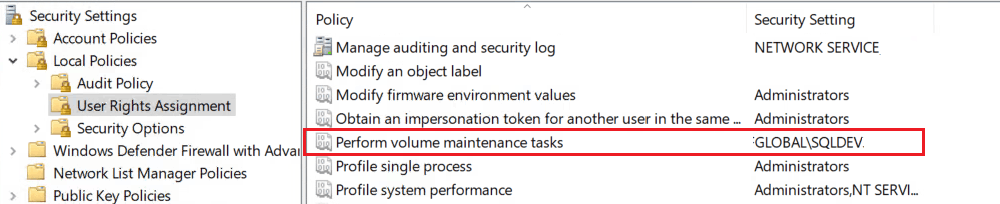
How To Enable Instant File Initialization

Step 3: Add the SQL Server Service Account:

Add the account running the SQL Server Database Engine service to: “Perform volume maintenance tasks”.

Apply the changes.

Step 4: Restart The SQL Service:

Restart the SQL Server service so that its security token includes the newly granted privilege.

First thing to remember, restarting the Database Engine causes an outage for that SQL Server instance hence you need to plan accordingly for your production environment.

Interview Tips: How to Answer?

The shortest answer would be we must grant “Perform Volume Maintenance Task” security permission to SQL Server service account to enable IFI. One should use Local Security Policy Editor.

This should suffice. If the interviewer is satisfied, he/she will move to next question otherwise they can ask if you can explain more in detail. Then you can explain each steps described above.

Hope this helps. Please leave a comment below if you have further questions.

You can also check the following:

Junior SQL Server DBA Interview Questions and Answers

Junior SQL DBA Interview Question Answers -Part2

Beginners SQL DBA Interview Questions Answers -Part3

Junior SQL DBA Interview Question Answers: Part 4

 

{ Add a Comment }

What is Instant File Initialization? SQL DBA Interview Q & A

Hi There! We are going to discuss What is Instant File Initialization. The idea here is to explain you what does Instant File Initialization (IFI) mean and how it works. How far you should explain to an Interviewer and what has changed in SQL 2022.

What is Instant File Initialization

What is Instant File Initialization?

It is basically a Windows Operating System (OS) feature. Whenever SQL Server creates or expands a data or log file, OS validates the disk by writing zeros to the files. This process is known as Zeroing process.

The internal steps are as follows:
  • Allocate the space on disk
  • Writes zeros to the entire allocated portion
  • Then make it available for use

It is a single threaded process and hence for large files the delay is quite visible. Instant File Initialization allows SQL Server to allocate space for data files without zeroing out the disk space first and hence reduces the wait time. Basically it skips the zeroing process.

When you are answering in an interview this much should suffice. Continue to read for more knowledge and to be able to answer any follow up questions.

Does IFI applies to Log File?

In the past, transaction log files could not use instant file initialization. However, starting with SQL Server 2022 (16.x) — across all editions — and in Azure SQL Database and Azure SQL Managed Instance, transaction log autogrowth can now use instant file initialization for growth events up to 64 MB.

By default, new databases are configured with a 64 MB autogrowth size, which means they automatically benefit from this improvement.

If the transaction log grows by more than 64 MB at a time, instant file initialization will not apply, and the growth will take longer as the space must be zero-initialized.

What are the database Activities benefited by IFI?

  • Creating a New Database
  • Adding data or log file to an existing database
  • Increasing the existing file size manually or due to auto growth option
  • Restoring a database from backup file

How IFI works if Transparent Data Encryption (TDE) is Enabled?

If TDE is enabled for a database, IFI stops working for datafile however it is allowed for transaction log growth, because of how the transaction log file grows, and the fact that the transaction log is written into in a serial fashion.

How IFI works in SQL Azure and Managed Instance?

  • In Azure SQL Database and Azure SQL Managed Instance, transaction log autogrowth events up to 64 MB can benefit from instant file initialization.
  • Instant file initialization is automatically used in the General Purpose and Business Critical tiers of Azure SQL Database and Azure SQL Managed Instance. It helps improve the growth of transaction log files.
  • Instant file initialization isn’t configurable in Azure SQL Database and Azure SQL Managed Instance.

What kind of Environments will be benefited by IFI?

  • High-availability systems
  • Large databases
  • Systems with frequent restores
  • Systems experiencing auto-growth delays

There are very few reasons not to enable it. Ideally it should be part of SQL server build process.

You may also like to check the following:

Junior SQL Server DBA Interview Questions and Answers

SQL DBA Interview Question Answers -Part2

Junior SQL DBA Interview Questions Answers -Part3

Junior SQL DBA Interview Question Answers: Part 4


{ Add a Comment }