Hi! This article is about another interview question on How To Enable Instant File Initialization (IFI). I have already explained about What is Instant File Initialization and few follow up questions on IFI.
Steps To Enable Instant File Initialization
Explaining here step by step for your knowledge so that you can answer with confidence and can deal with any follow up questions. At the end I have explained how to answer in Interview.
Step1: Identify SQL Server Service Account
Now there are multiple ways of identifying SQL Server Service account and you can refer How To Identify SQL Server Service Account: SQL DBA Interview Q&A
For quick reference mentioning the most common way here:
Open:
SQL Server Configuration Manager
Navigate to:
SQL Server Services
Find your Database Engine service, for example:
SQL Server (MSSQLSERVER)
or a named instance:
SQL Server (SQLPROD)
Note the account shown under Log On As.

Step 2: Open Local Security Policy
On the Windows server > run and type:
secpol.msc
Then navigate to:
Local Policies
-> User Rights Assignment
-> Perform volume maintenance tasks
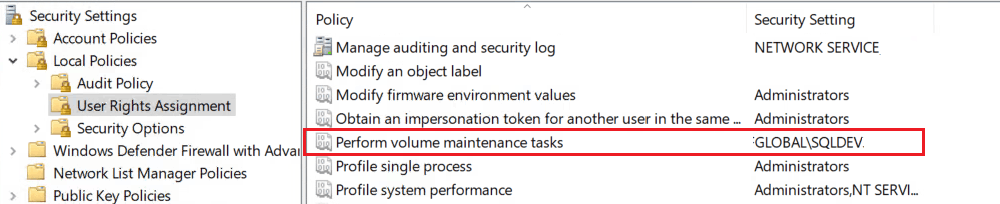
Step 3: Add the SQL Server Service Account:
Add the account running the SQL Server Database Engine service to: “Perform volume maintenance tasks”.
Apply the changes.
Step 4: Restart The SQL Service:
Restart the SQL Server service so that its security token includes the newly granted privilege.
First thing to remember, restarting the Database Engine causes an outage for that SQL Server instance hence you need to plan accordingly for your production environment.
Interview Tips: How to Answer?
The shortest answer would be we must grant “Perform Volume Maintenance Task” security permission to SQL Server service account to enable IFI. One should use Local Security Policy Editor.
This should suffice. If the interviewer is satisfied, he/she will move to next question otherwise they can ask if you can explain more in detail. Then you can explain each steps described above.
Hope this helps. Please leave a comment below if you have further questions.
You can also check the following:
Junior SQL Server DBA Interview Questions and Answers
Junior SQL DBA Interview Question Answers -Part2
Beginners SQL DBA Interview Questions Answers -Part3
Junior SQL DBA Interview Question Answers: Part 4