Hi There! When an interviewer asks “What is your experience or How do you handle blocking alerts in production?”, they are testing more than your theoretical knowledge of SQL Server locks.
Actually they want to know whether you can handle a real production incident.

A DBA should be able to:
- Detect blocking.
- Identify the complete blocking chain.
- Find the head blocker.
- Capture evidence.
- Analyze SQL statements and transactions.
- Evaluate business impact.
- Take a safe corrective action.
- Perform root-cause analysis.
- Implement a permanent solution.
Best 1 Minute Interview Answer:
Yes, I regularly handle SQL Server blocking alerts in the production environment. We have a monitoring job that continuously tracks blocking processes; consequently, an alert is generated whenever a process remains blocked for more than 10 minutes.
I first validate whether the blocking still exists and identify the blocked sessions, blocking SPID, and ultimately the head blocker.
To get the blocking and blocked queries information we use a T-SQL script using predominantly “sys.sysprocesses,” with “sys.dm_exec_sql_text()”. Refer Root Blocker Detection Query For SQL Server
I first capture all the evidence and evaluate the production impact. After that I coordinate with the relevant application team by providing all the collected details.
Now after reviewing, if application team approves to Kill the root blocker, I go ahead and Kill the session and monitor again by running the Root Blocker Detection Query For SQL Server few more times. This ensures that same blocker query is not spawning from different SPIDs.
In such case, I ask app team to stop the particular application module or whatever steps they need to take from application end.
If similar blocking reoccurs often, then I request Problem Management Team to open a Problem Record and we work with application team for RCA (Root Cause Analysis) and permanent resolution.
Now since you know what to answer in an Interview, you must know what NOT TO.
Common Interview Mistakes or You Should Avoid:
- Whenever we get blocking, I run
sp_who2and find the root blocker and Kill it. - We have a query to detect root blocker. I pickup the query from our repository and run it.
- I monitor and wait until it clears automatically.
- I have never faced blocking in our environment. Blocking never happens.
- In case of blocking alert, I escalate or assign the ticket to senior DBA.
These answers will raise doubt on your practical experience as a DBA and hence be careful and avoid making such mistakes.
Hope this is helpful. Please leave a comment below on your interview experience.
You can also refer the following articles for Interview preparation:
Junior SQL Server DBA Interview Questions and Answers
Junior SQL DBA Interview Question Answers -Part2
How To Identify SQL Server Service Account: SQL DBA Interview Q&A
Junior SQL DBA Interview Questions Answers -Part3
Junior SQL DBA Interview Question Answers: Part 4
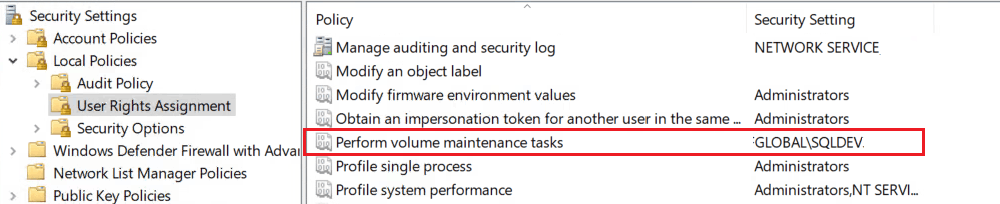
What is Instant File Initialization? SQL DBA Interview Q & A
Why Instant File Initialization Is Not Enabled By Default: SQL DBA Interview Q&A
How To Enable Instant File Initialization? SQL DBA Interview Q & A