Hi There! if you are working with SQL Server or any RDBMS (Relational Database Management System), understanding difference between blocking and deadlock is very important.
Concurrency is inevitable as multiple users and processes interact with the same data simultaneously and database engine uses locks to maintain the integrity. Now the Locking has its side effects known as blocking and deadlocks. While they are often confused as similar, they are actually different.
What is Blocking?
Blocking occurs when one session/SPID holds a lock on a specific resource and a second SPID attempts to acquire a conflicting lock type on the same resource.
When the owning session releases the lock, the second connection can acquire its own lock on the resource and continue processing.
it’s normal behavior in SQL Server. It may happen many times without impacting the performance if the sessions does not lock a resource for longer period.
In some scenarios this can cause performance issues if locks are not released for longer period.
Example:
Session 1 Session 2
——————— —————————
BEGIN TRANSACTION BEGIN TRANSACTION
UPDATE Employees SELECT * FROM Employees
SET Salary = 5000 WHERE ID = 1
WHERE ID = 1
- Session 1 updates a row → gets an exclusive lock (X)
- Session 2 tries to read same row → needs shared lock (S)
- Shared lock is incompatible with exclusive lock → blocking occurs
Let’s make it clear with an interesting real world example.
Real-World Blocking Example (Airport Restroom):
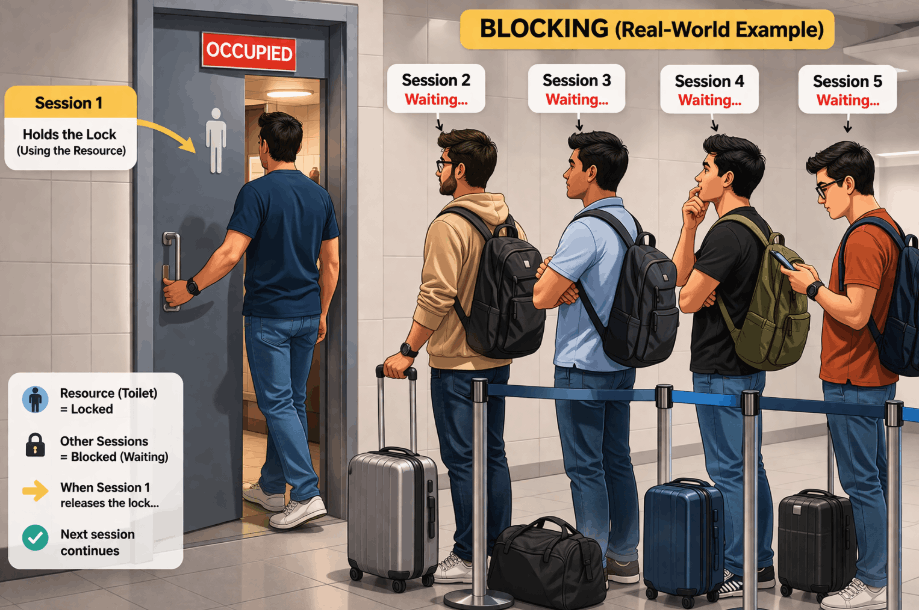
- One person is inside the restroom (holding the “lock”)
- Others are waiting outside in a queue (blocked sessions)
- Once the person exits, the next person can go in (lock released → next process continues)
Just like in SQL Server:
- The resource = restroom
- Lock holder = person inside
- Blocked sessions = people waiting
This is normal and all people waiting (blocked sessions) for their turn waits. But if the person inside (Lock holder) takes longer to leave the restroom (the resource) can cause discomfort (performance issue) for the people waiting outside.
What is Deadlock?
Deadlock occurs when two or more processes/transactions permanently waits for each other because each transaction has a lock on a resource that the other transaction is trying to lock.
The SQL Engine detects this situation through lock manager, that the contention will never resolve on its own. Hence to break the deadlock, it terminates one of the processes which is of lower cost to rollback, allowing the other to complete. The terminated process is known as the deadlock victim.
Example:
Session 1 Session 2
——————— ————————-
BEGIN TRANSACTION BEGIN TRANSACTION
UPDATE Employees UPDATE Departments
SET Salary = 5000 SET Budget = 100000
WHERE ID = 1 WHERE DeptID = 10
UPDATE Departments UPDATE Employees
SET Budget = 200000 SET Salary = 6000
WHERE DeptID = 10 WHERE ID = 1
[Session 1]
│
│ holds lock on Employees(1)
▼
[Resource: Employees(1)]
▲
│ needed by Session 2
│
[Session 2]
│
│ holds lock on Departments(10)
▼
[Resource: Departments(10)]
▲
│ needed by Session 1
│
(Transactions permanently waits for each other causing Deadlock)
Real-World Deadlock Example (Traffic Road):
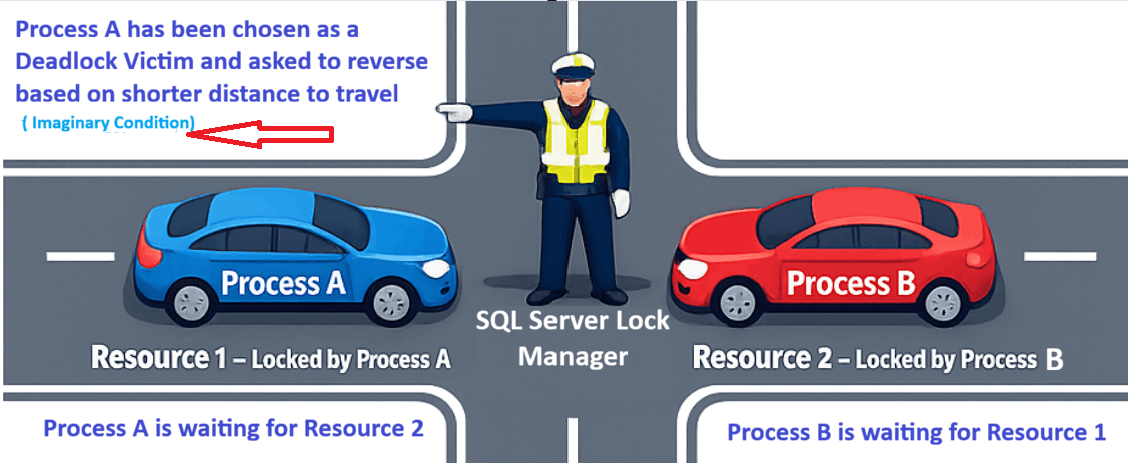
- Blue Car (Process A) holding the lock on the road (Resource 1) which Red Car (Process B) wants
- Red Car (Process B) holding the lock on the road (Resource 2) which Blue Car (Process A) wants
- Both the Cars wants the other car to backout without releasing their own locks creating a Deadlock situation
- The traffic police (SQL Server Lock Manager) intervenes and asks one of the Cars (in this example Blue one) to reverse because let’s imagine he sees it has less distance to travel to reverse and give the path to Red Car. Hence the Blue Car (Process A) becomes the Deadlock Victim and the deadlock resolves.
Now since you have got a fair idea on blocking and deadlock, let’s create a demo in SQL Server.
Blocking Demo:
Create a database and table. Insert two records.
CREATE Database SQLGeeksPro;
GO
USE SQLGeeksPro;
GO

CREATE TABLE dbo.Employee
(
    EmployeeID INT PRIMARY KEY,
    EmployeeName VARCHAR(100),
    Salary INT
);

INSERT INTO dbo.Employee VALUES
(1, 'John', 50000),
(2, 'Mary', 60000);
GO
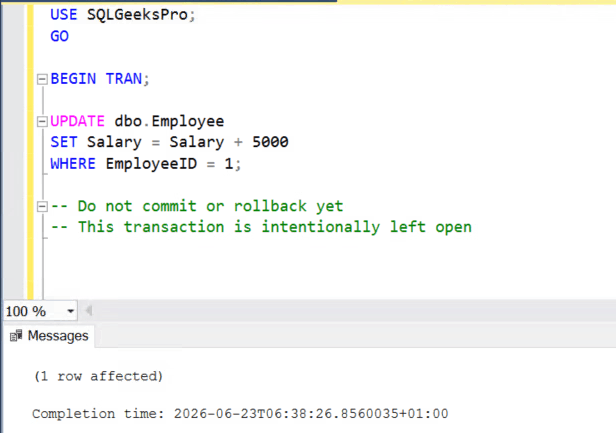
Session 1: Start a transaction holding the lock on Employee Table
Open Query Window 1 and run:
USE SQLGeeksPro;
GO

BEGIN TRAN;

UPDATE dbo.Employee
SET Salary = Salary + 5000
WHERE EmployeeID = 1;

-- Do not commit or rollback yet
-- This transaction is intentionally left open
Session 2: Try to Read the Same Row
Open another window and run the below query:
USE SQLGeeksPro;
GO

SELECT *
FROM dbo.Employee
WHERE EmployeeID = 1;
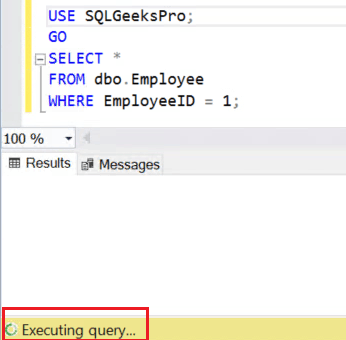
As you can see the query execution continues and never ends for the SELECT query. Now let’s check the blocking details using the query Root Blocker Detection Query For SQL Server
Result Set:
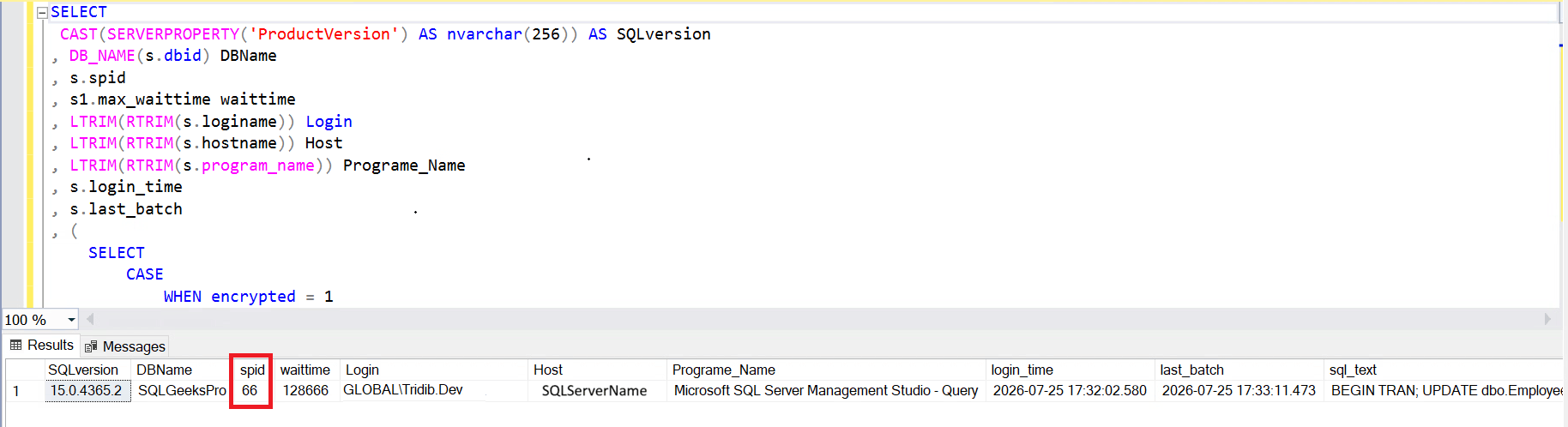
You can see in the screen shot, spid is the session which is the root blocker. To clear the blocking you need to either commit or rollback the session1 (in this example spid 66).
Deadlock Demo:
Session 1: Run the Script in Session 1
USE SQLGeeksPro;
GO

BEGIN TRANSACTION;

UPDATE dbo.Employee
SET Salary = Salary + 1000
WHERE EmployeeID = 1;

PRINT 'Session 1 updated EmployeeID 1';

WAITFOR DELAY '00:00:10';

UPDATE dbo.Employee
SET Salary = Salary + 1000
WHERE EmployeeID = 2;

COMMIT TRANSACTION;

PRINT 'Session 1 completed successfully';

GO
Session 1 first places an exclusive lock on the row for EmployeeID = 1.
It then waits for ten seconds before attempting to update EmployeeID = 2
Session 2: Run the Script in Session 2
USE SQLGeeksPro;
GO

BEGIN TRANSACTION;

UPDATE dbo.Employee
SET Salary = Salary + 2000
WHERE EmployeeID = 2;

PRINT 'Session 2 updated EmployeeID 2';

WAITFOR DELAY '00:00:10';

UPDATE dbo.Employee
SET Salary = Salary + 2000
WHERE EmployeeID = 1;

COMMIT TRANSACTION;

PRINT 'Session 2 completed successfully';

GO
Session 2 first places an exclusive lock on the row for EmployeeID = 2.
It then waits for ten seconds before attempting to update EmployeeID = 1.
One of the sessions should receive an error similar to the following:
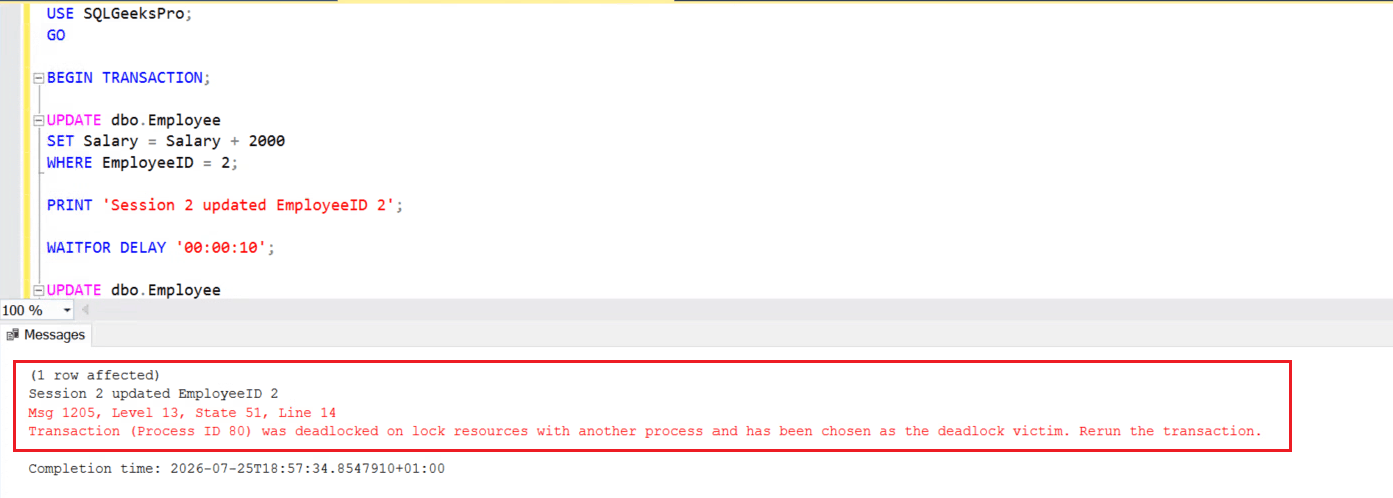
Not to mention, The exact process ID, state number, and resource information may vary.
The transaction selected as the deadlock victim is rolled back automatically. The successful transaction remains committed.
Hope I am able to clarify the Difference Between Blocking and Deadlock. Please leave your comments below.