Month: February 2026

What is Instant File Initialization? SQL DBA Interview Q & A

Hi There! We are going to discuss What is Instant File Initialization. The idea here is to explain you what does Instant File Initialization (IFI) mean and how it works. How far you should explain to an Interviewer and what has changed in SQL 2022.

What is Instant File Initialization

What is Instant File Initialization?

It is basically a Windows Operating System (OS) feature. Whenever SQL Server creates or expands a data or log file, OS validates the disk by writing zeros to the files. This process is known as Zeroing process.

The internal steps are as follows:
  • Allocate the space on disk
  • Writes zeros to the entire allocated portion
  • Then make it available for use

It is a single threaded process and hence for large files the delay is quite visible. Instant File Initialization allows SQL Server to allocate space for data files without zeroing out the disk space first and hence reduces the wait time. Basically it skips the zeroing process.

When you are answering in an interview this much should suffice. Continue to read for more knowledge and to be able to answer any follow up questions.

Does IFI applies to Log File?

In the past, transaction log files could not use instant file initialization. However, starting with SQL Server 2022 (16.x) — across all editions — and in Azure SQL Database and Azure SQL Managed Instance, transaction log autogrowth can now use instant file initialization for growth events up to 64 MB.

By default, new databases are configured with a 64 MB autogrowth size, which means they automatically benefit from this improvement.

If the transaction log grows by more than 64 MB at a time, instant file initialization will not apply, and the growth will take longer as the space must be zero-initialized.

What are the database Activities benefited by IFI?

  • Creating a New Database
  • Adding data or log file to an existing database
  • Increasing the existing file size manually or due to auto growth option
  • Restoring a database from backup file

How IFI works if Transparent Data Encryption (TDE) is Enabled?

If TDE is enabled for a database, IFI stops working for datafile however it is allowed for transaction log growth, because of how the transaction log file grows, and the fact that the transaction log is written into in a serial fashion.

How IFI works in SQL Azure and Managed Instance?

  • In Azure SQL Database and Azure SQL Managed Instance, transaction log autogrowth events up to 64 MB can benefit from instant file initialization.
  • Instant file initialization is automatically used in the General Purpose and Business Critical tiers of Azure SQL Database and Azure SQL Managed Instance. It helps improve the growth of transaction log files.
  • Instant file initialization isn’t configurable in Azure SQL Database and Azure SQL Managed Instance.

What kind of Environments will be benefited by IFI?

  • High-availability systems
  • Large databases
  • Systems with frequent restores
  • Systems experiencing auto-growth delays

There are very few reasons not to enable it. Ideally it should be part of SQL server build process.

You may also like to check the following:

Junior SQL Server DBA Interview Questions and Answers

SQL DBA Interview Question Answers -Part2

Junior SQL DBA Interview Questions Answers -Part3

Junior SQL DBA Interview Question Answers: Part 4


{ Add a Comment }

Fix XTP Configuration Is Invalid Error In Always On

Hello, this article is going to be part2 of How To Fix: XTP Configuration Is Invalid where we have learnt about the SCOM alert, what is XTP in SQL Server and how to fix the same in stand alone SQL Instance.

Here we’ll learn about the steps to fix XTP Configuration is invalid error in Always On SQL Instance. Hence I would like you to first go through the first article.

Steps to Fix Configuration Is Invalid Error In Always On

  1. Calculate Resource Pool Memory
  2. Create a resource pool
  3. Bind the database to the pool
  4. Bring the database offline and then online
  5. Confirm the Binding

Now you may be thinking, well these are exactly the same steps for stand alone SQL Instance. Yes, you’re right, however in case of Always On you need to perform few extra steps for the point no. 4.

I have already explained how to calculate resource pool memory in the first article Link. Here I’ll start from point no.2

2. Create a resource pool

In case of Always On you have to create the resource pool in all the replicas.
Execute the below query on each replica.

 CREATE RESOURCE POOL PoolName  --Provide the pool name maintaining Organization's naming convention
  WITH
   (
     MIN_MEMORY_PERCENT = 63,  --Adjust as needed/calculated 
     MAX_MEMORY_PERCENT = 63   --Often set to the same value as MIN_MEMORY_PERCENT for Predictability
   )
 GO
 ALTER RESOURCE GOVERNOR RECONFIGURE;

e.g. XTP Configuration is Invalid

3. Bind the database to the pool:

Execute the below query on all the Replicas

EXEC  sys.sp_xtp_bind_db_resource_pool YourDatabaseName, 'PoolName';

e.g.XTP Configuration is Invalid

4. Bring the database offline and then online:

This is a bit tricky in case of Always On setup. You need to remove the db from Availability Group before you can take the db offline.

Following are the steps:

  • Remove the database from Availability Group
  • Take the database Offline and then Online on Primary Replica
  • Readd the database back to Availability Group
  • Failover the Availability Group to each of the replicas and Failback to the original Primary Replica.
5. Confirm the Binding:

This also needs to be executed on all the Replicas

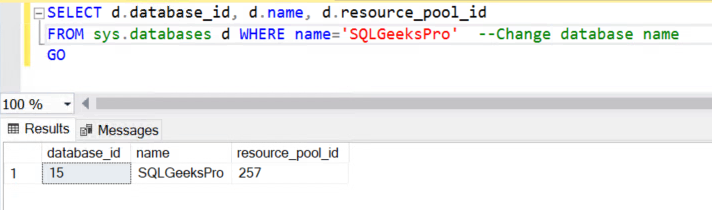
SELECT d.database_id, d.name, d.resource_pool_id   
FROM sys.databases d WHERE name='SQLGeeksPro' --Change database name
GO

Example Result Set:

XTP Configuration is Invalid in Always On

As you can observe there is an associated resource_pool_id for the example database “SQLGeeksPro”.

Hope this helps. Please feel free to leave a comment.

{ Add a Comment }

What Does SQL DBA Actually Do?

Hi There! Whether you are a student, aspiring data professional, or thinking to transform to a DBA role and wondering “What Does SQL DBA Actually Do”, you are not alone. The title Database Administrator (DBA) might sound mysterious, but it’s one of the most critical roles in IT .

What Does SQL DBA Actually Do

This guide breaks down what a SQL Server DBA really does, the tools they use and additional responsibilities as they grow in their carrier.

There are basically two type of DBA jobs in the IT industry.

Application DBA/Logical DBA — Works closely with Application Developers. Designs schema, tables, indexes, and relationships according to application needs. Require Strong SQL coding skills.

Production/Infrastructure DBA — Focuses on database operations, uptime, performance, and recovery in the production environment. Demands Strong system administration and database configuration skills.

To give you one real time scenario to understand a basic difference between the two:

When a Query is running slow, Production DBA will identify the exact slow running query and provide the query(execution) plan to App DBA. App DBA will analyze the plan and fix the query.

In some organizations the responsibilities may overlap depending upon the job requirement.

Key Responsibilities of a SQL Server DBA:

Area Application DBA Production DBA
Database Backup & Recovery Is not Responsible Ensure all database servers are backed up in alignment with Recovery Point Objective (RPO) and regularly
tests restores of the backup files to make sure Recovery Time Objective (RTO) can be met.
Database Design Designs schema, tables, indexes, and relationships according to application needs. Ensures design aligns with operational standards and performance requirements.
SQL & Performance Tunes SQL queries, stored procedures, and application-side performance. Tunes system-level performance—memory, I/O, CPU, and indexing strategies.
Development Support Works with developers during development and testing phases. Supports deployments, migrations, and production rollouts.
Maintenance Less involved in backups and system maintenance. Handles patching, upgrades, Index maintenance and monitoring.
Security & Access Defines roles and privileges for applications. Manages overall database security, auditing, and compliance.
Troubleshooting Fixes app-specific data or query issues. Diagnoses system-level issues, server crashes, corruption, and performance bottlenecks.

Essential Tools/Functionalities Every SQL Server DBA Should Know:

Tool Description
SQL Server Management Studio (SSMS) Core interface for managing SQL databases.
Azure Data Studio Modern, cross-platform alternative with notebooks.
SQL Server Extended Events For tracing and debugging query performance.
Dynamic Management Views (DMVs) Provides insight into SQL Server to assist with troubleshooting and monitoring.
SQL Agent Service Automates scheduled jobs and maintenance tasks.
PowerShell / dbatools For automating DBA workflows.
Query Store Simplifies the process of identifying and resolving Query performance issues by providing insights into query plan.
Monitoring Tool like Redgate SQL Toolbelt Professional suite for monitoring, comparison, and deployments.

Now as you grow in your DBA carrier, your role will not be limited to only technical work. I have tried to put few more critical responsibilities based on my experience.

Automation: Analyze repetitive tasks and check what and how far a task can be automated. Work with automation team, provide suggestions etc.

Incident reduction: Senior DBA/leads will work on analyzing ticket dumps and work on reducing repetitive incidents on same SQL Instance.

RCA (Root Cause Analysis) : On P1/P2 incidents, Leads/SME (Subject Matter Specialist) will work with Problem Management Team to document the RCA.

SOP (Standard Operating Procedure): You’ll be responsible for preparing SOPs for junior resources or on particular process to be followed for repetitive activities. e.g. Steps to Follow from database end during OS patching, Database Decommission, SQL Instance Provision/Decommission etc.

Customer Escalations: Handling customer escalations will be one of your prime responsibilities.

Mentoring Junior DBAs: Guiding Junior DBAs and providing necessary technical/process related trainings. Making proper plan for newly onboarded team member to bring him/her up to the speed etc.

Planning Major Activities: You will need to prepare Runbooks for major activities like DR (Disaster Recovery Drill), SQL Server upgrades etc.

Hope now you have got an overall idea about what Does a SQL DBA Actually Do. Please feel free to comment in case you want me to add any further responsivities.

You can also refer the following links:

What is SQL Server

Understanding SQL Server Versions and Editions

The Complete Guide to SQL Server System Databases


{ Add a Comment }