Hi there! In this article, we’ll explore a SQL Server Root Blocker Detection Query that helps DBAs quickly identify the source of blocking and troubleshoot performance bottlenecks.
Blocking is common in any RDBMS (Relational Database Management System). Concurrency is inevitable as multiple processes try to access same data simultaneously.
One session holds a lock and prevents other sessions from proceeding, application response times can increase dramatically. In complex blocking chains, identifying the main blocker is critical because terminating a blocked session does not resolve the underlying issue. The real solution is to locate and investigate the session at the top of the blocking chain.
What is Root Blocker?
A root blocker is the session that is not blocked by any other session but is blocking one or more sessions.
Consider the following blocking chain:
Session 55 → blocks Session 68
Session 68 → blocks Session 72
Session 72 → blocks Session 85
In this scenario:
- Session 55 is the Root Blocker
- Session 68, 72, and 85 are blocked sessions
Resolving the issue usually requires investigating Session 55 rather than terminating. Resolving the root blocker typically clears the entire blocking chain. Never kill any session without consent from application owner/team specifically in production environment.
There are many queries out there in the net. But the below one I found to be most affective in my repository.
SQL Server Root Blocker Detection Query
SELECT @@servername [server]
, CAST(SERVERPROPERTY('ProductVersion') AS nvarchar(256)) AS SQLversion
, DB_NAME(s.dbid) DBName
, s.spid
, s1.max_waittime waittime
, LTRIM(RTRIM(s.loginame)) Login
, LTRIM(RTRIM(s.hostname)) Host
, LTRIM(RTRIM(s.program_name)) Programe_Name
, s.login_time
, s.last_batch
, (
    SELECT
        CASE
            WHEN encrypted = 1
                THEN 'Encrypted'
            ELSE
                ISNULL(
                    CAST([text] AS nvarchar(max)),
                    N'empty'
                )
        END
    FROM sys.dm_exec_sql_text(s.[sql_handle])
) sql_text
FROM master.sys.sysprocesses s WITH (nolock)
INNER JOIN
(
    SELECT
        blocked,
        MAX(waittime) [max_waittime]
    FROM master.sys.sysprocesses
    WITH (nolock)
    GROUP BY blocked
) s1
ON s.spid = s1.blocked
WHERE s.blocked = 0
AND s.spid != @@spid;
Example Resultset:
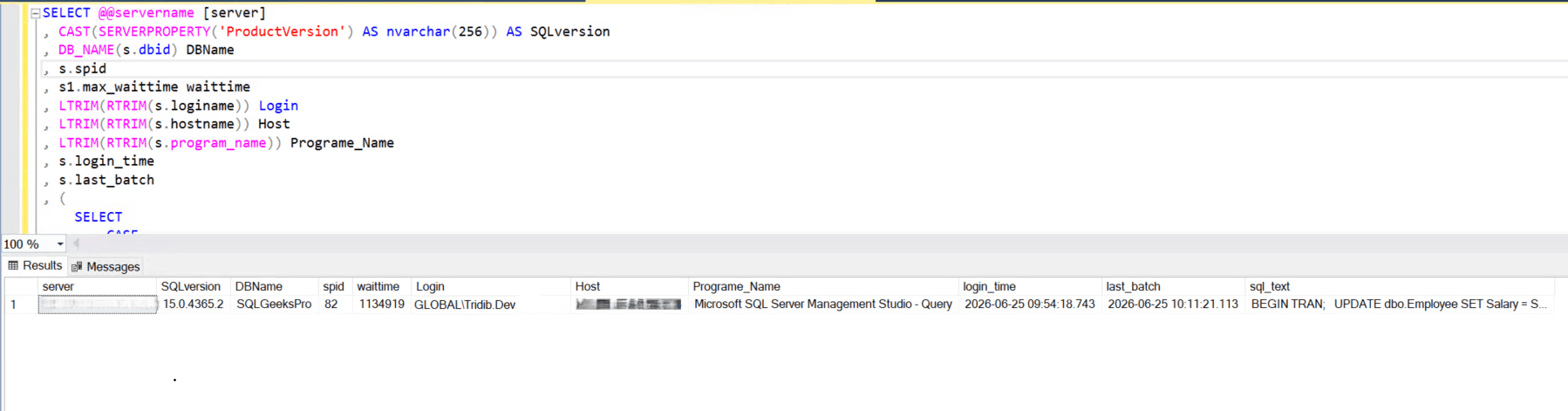
Let’s understand the output:
| Column | Description |
|---|---|
| Server | SQL Server instance name. |
| SQLVersion | SQL Server version. |
| DBName | Database where the blocking occurs. |
| SPID | Session ID of the root blocker. |
| WaitTime | Maximum wait time of the blocked sessions (in milliseconds). |
| Login | SQL Server login executing the blocking session. |
| Host | Client computer (host) name from which the connection originated. |
| Program_Name | Application or program connected to SQL Server. |
| Login_Time | Date and time when the session was established. |
| Last_Batch | Date and time when the last SQL batch was executed. |
| SQL_Text | SQL statement currently being executed by the blocking session. |
As you can see, the output has all the required information. The Query is a valuable troubleshooting script for identifying blocking chains quickly. Hope this is helpful.
You may also want to check the following scripts:
PowerShell Script – How many Times SQL Service Restarted
Script To List SQL Agent Jobs and Schedules
Query to List SQL Database Role Owner Across All Databases
Script to get SQL Cluster Failover Time and Node Name