Hi There! This article is to explain What Is SQL Server Transaction and this is part of the SQL Server DBA Tutorial: Beginners To Pro category. This will help in your journey to become a better DBA.
What is SQL Server Transaction?
A SQL Server transaction is a sequence of one or more SQL statements that are executed together. The transaction ensures that either all operations succeed or none of them are applied to the database.
In other words, batch of SQL Statement(s) performing a single or multiple activities on a database. Transactions ensures data integrity by either of the below:
- Committing all changes together
- Rolls back changes if any operation fails.
Example 1:

Example 2:

Practical Example: Bank Money Transfer:
Suppose you are transferring money from Account A to Account B.
Both operations must succeed together or fail. I.e. Either money should get credited to Account B or the money should not debit from Account A.
Different Modes Of SQL Server Transactions:
- Auto-commit transactions
- Implicit transactions
- Explicit transactions
- Batch-scoped transactions
Auto-commit transactions:
Each individual statement is a transaction. The auto-commit transaction mode is the default SQL Server transaction mode. When an SQL statement executes successfully, the system commits the transaction and permanently saves the data modifications in the database. If any statement encounters an error during execution, the system rolls back the transaction and reverts all changes made during that transaction.
Example:
 INSERT INTO Products (ProductID, ProductName, Price)
 VALUES (1,'Laptop',1200)

 UPDATE Products SET Price = 1300 WHERE ProductID = 1

 DELETE FROM Products WHERE ProductID = 1
As you must have observed that there is no BEGIN TRAN statement mentioned in the above example and hence each statement (INSERT, UPDATE, DELETE) runs as its own transaction.
Imagine a scenario when INSERT and UPDATE completes successfully but the DELETE statement fails, only the DELETE is rollback, the changes for INSERT and UPDATE remains saved.
Implicit transactions
In SQL Server, an Implicit Transaction starts automatically when you execute certain SQL statements. The transaction does not commit automatically; you must explicitly end it using COMMIT or ROLLBACK.
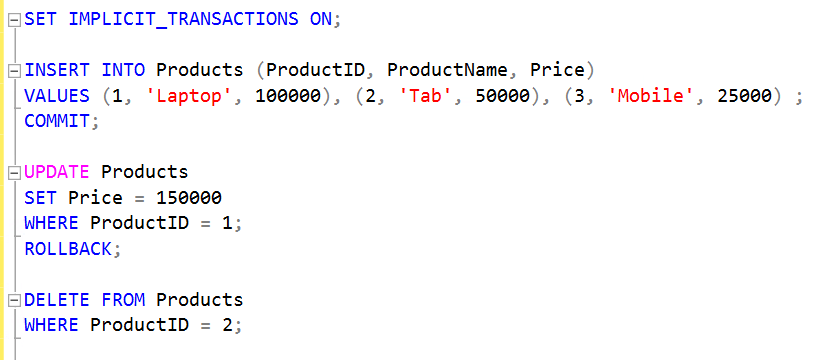
Let’s understand Implicit transaction by coding example:
Create a Table:
CREATE TABLE Products (
    ProductID INT PRIMARY KEY,
    ProductName VARCHAR(50),
    Price DECIMAL(10,2)
)
Enable Implicit Transaction Mode:
SET IMPLICIT_TRANSACTIONS ON;
Commit an Implicit Transaction:
INSERT INTO Products (ProductID, ProductName, Price)
VALUES (1,'Laptop',1200)
COMMIT;
Rollback an Implicit Transaction:
UPDATE Products SET Price = 1300 WHERE ProductID = 1
ROLLBACK;
Do nothing and it will keep an open transaction:
DELETE FROM Products WHERE ProductID = 1
Since you have not COMMIT or ROLLBACK this statement, it will keep this as open transaction.
Reference Screen Shot:
Explicit transactions:
In SQL Server, an Explicit Transaction is a transaction that you start manually using BEGIN TRANSACTION and end using COMMIT or ROLLBACK. This gives you full control over when the transaction starts and ends.
Explicit Transaction with COMMIT:
BEGIN TRANSACTION

INSERT INTO Products (ProductID, ProductName, Price)
VALUES (1,'Laptop',1200)

UPDATE Products SET Price = 1300 WHERE ProductID = 1

DELETE FROM Products WHERE ProductID = 1

COMMIT;
This will save all the results of INSERT, UPDATE and DELETE. If you replace COMMIT with ROLLBACK command, it will save nothing.
Batch-scoped transactions:
Applicable only to Multiple Active Result Sets (MARS), when a Transact-SQL explicit or implicit transaction starts in a MARS session, SQL Server treats it as a batch-scoped transaction. If the transaction is not committed or rolled back before the batch finishes, SQL Server automatically rolls it back.
You may also like to go through the below articles:
Understanding SQL Server Versions and Editions
The Complete Guide to SQL Server System Databases