Month: March 2026

PowerShell Script – How many Times SQL Service Restarted

Hi, being SQL DBA there may be situations when you need to find out How many times SQL Service restarted. E.g. Let’s say there is an issue going on with a SQL Server and services got restarted. Your boss has asked you “Is it the first time it has happened? Can you tell me quickly the SQL Service restart history.

This is just one example, whatever may be the scenario, it is always good to have a PowerShell script handy.

The script counts the no. of SQL Server error logs and scan them for the text “SQL Server is starting”.

The output will have the complete message in the error log containing the text along with date and time of occurrence in server local time zone.

Script To Find How Many Times SQL Service Restarted:

####################################################################
# Objective: To Check how many times SQL Services got restarted 
# Author: Tridib Dev
# Source:https://sqlgeekspro.com/
# Parameter: You need to provide SQL Instance Name
#################################################################### 

# Define Input Parameter for SQL Instance Name
param([parameter(Mandatory = $true)] $SQLInstanceName)

Write-host 'SQL Service restart Details for: ' $SQLInstanceName
Write-host '-----------------------------------------------------------'
Write-host " "

# Using SMO for Server Object creation
$srv = New-Object ('Microsoft.SqlServer.Management.Smo.Server') $SQLInstanceName
# Loading sqlserver module
Import-Module sqlserver -DisableNameCheck

# Defining the connection string which helps in establishing connection from remote server
$connection = "Data Source=$SQLInstanceName; Initial Catalog=master; Integrated Security=True; trustservercertificate=True;"

# Get error log list
$logs = Invoke-Sqlcmd -ConnectionString $connection -Query "EXEC xp_enumerrorlogs"

# Count no. of Error logs
$logCount = $logs.Count

Write-Host "Number of SQL Server error logs: $logCount"

foreach ($i in 0..$logCount) {
     
    # Call the ReadErrorLog method
    $logEntries = $srv.ReadErrorLog($i)
    
    # Filter and display results
    $logEntries | 
        Where-Object { ($_.Text -match 'SQL Server is starting') } |
        Format-Table LogDate, ProcessInfo, Text -AutoSize
}

Once you execute the script in PowerShell ISE, it will ask for the SQL Instance name for which you want to find the SQL Service restart history:
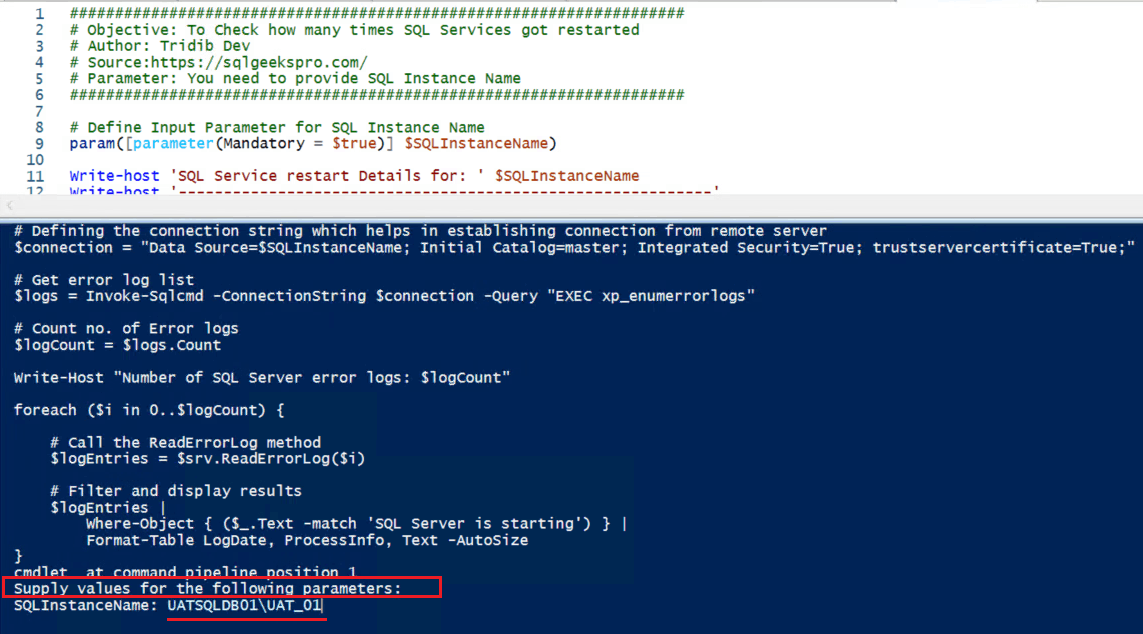
PowerShell Script How Many Times SQL Service Restarted

Example Result Set:
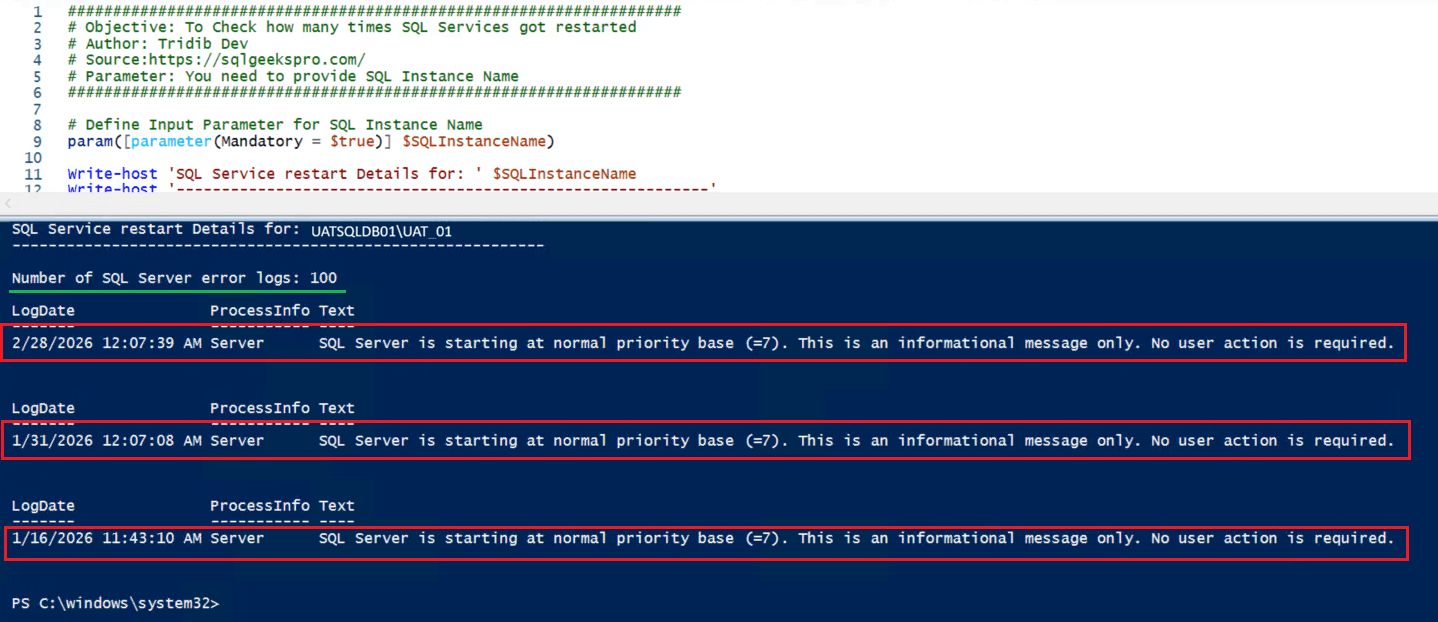
How Many Times SQL Service Restarted

The output shows there are 100 SQL Error log files and the script has scanned them all. The SQL Service has restarted 3 times.

Hope it is is helpful. Please feel free to customize the script as per your requirements. Also you can use the same script to scan any other messages/errors by replacing the text.

Please leave a comment about your experience. You may also like to check the following interesting scripts.

Powershell Script to Validate SQL Servers

Powershell Script to Create Folders

List all permissions for a user in all or selective databases

Powershell Script to Create Folders



{ Add a Comment }

What Is SQL Server Transaction: Complete Beginner’s Guide

Hi There! This article is to explain What Is SQL Server Transaction and this is part of the SQL Server DBA Tutorial: Beginners To Pro category. This will help in your journey to become a better DBA.

What is SQL Server Transaction?

A SQL Server transaction is a sequence of one or more SQL statements that are executed together. The transaction ensures that either all operations succeed or none of them are applied to the database.

In other words, batch of SQL Statement(s) performing a single or multiple activities on a database. Transactions ensures data integrity by either of the below:

  • Committing all changes together
  • Rolls back changes if any operation fails.

Example 1:

What is SQL Transaction

Example 2:

What is SQL Transaction


Practical Example: Bank Money Transfer:

Suppose you are transferring money from Account A to Account B.
Both operations must succeed together or fail. I.e. Either money should get credited to Account B or the money should not debit from Account A.

Different Modes Of SQL Server Transactions:

  • Auto-commit transactions
  • Implicit transactions
  • Explicit transactions
  • Batch-scoped transactions

Auto-commit transactions:

Each individual statement is a transaction. The auto-commit transaction mode is the default SQL Server transaction mode. When an SQL statement executes successfully, the system commits the transaction and permanently saves the data modifications in the database. If any statement encounters an error during execution, the system rolls back the transaction and reverts all changes made during that transaction.

Example:

 INSERT INTO Products (ProductID, ProductName, Price)
 VALUES (1,'Laptop',1200)

 UPDATE Products SET Price = 1300 WHERE ProductID = 1

 DELETE FROM Products WHERE ProductID = 1

As you must have observed that there is no BEGIN TRAN statement mentioned in the above example and hence each statement (INSERT, UPDATE, DELETE) runs as its own transaction.

Imagine a scenario when INSERT and UPDATE completes successfully but the DELETE statement fails, only the DELETE is rollback, the changes for INSERT and UPDATE remains saved.

Implicit transactions

In SQL Server, an Implicit Transaction starts automatically when you execute certain SQL statements. The transaction does not commit automatically; you must explicitly end it using COMMIT or ROLLBACK.

Let’s understand Implicit transaction by coding example:

Create a Table: 
CREATE TABLE Products ( 
    ProductID INT PRIMARY KEY, 
    ProductName VARCHAR(50),
    Price DECIMAL(10,2)
)
Enable Implicit Transaction Mode:
SET IMPLICIT_TRANSACTIONS ON;
Commit an Implicit Transaction:
INSERT INTO Products (ProductID, ProductName, Price)
VALUES (1,'Laptop',1200)
COMMIT;
Rollback an Implicit Transaction:
UPDATE Products SET Price = 1300 WHERE ProductID = 1
ROLLBACK;
Do nothing and it will keep an open transaction:
DELETE FROM Products WHERE ProductID = 1

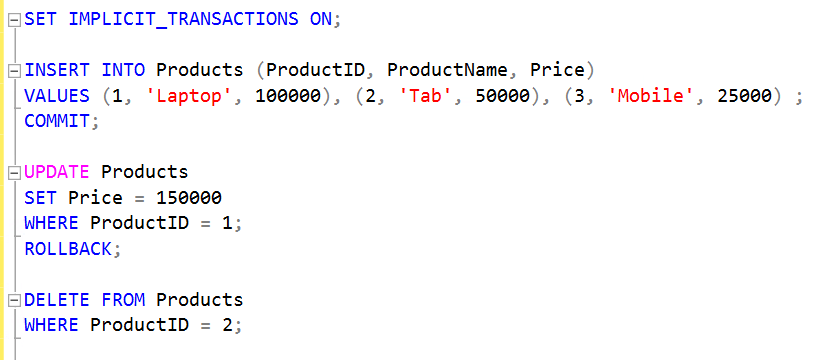
Since you have not COMMIT or ROLLBACK this statement, it will keep this as open transaction.
Reference Screen Shot:
What is SQL Server Transaction

Explicit transactions:

In SQL Server, an Explicit Transaction is a transaction that you start manually using BEGIN TRANSACTION and end using COMMIT or ROLLBACK. This gives you full control over when the transaction starts and ends.

Explicit Transaction with COMMIT:
BEGIN TRANSACTION

INSERT INTO Products (ProductID, ProductName, Price)
VALUES (1,'Laptop',1200)

UPDATE Products SET Price = 1300 WHERE ProductID = 1

DELETE FROM Products WHERE ProductID = 1

COMMIT;

This will save all the results of INSERT, UPDATE and DELETE. If you replace COMMIT with ROLLBACK command, it will save nothing.

Batch-scoped transactions:

Applicable only to Multiple Active Result Sets (MARS), when a Transact-SQL explicit or implicit transaction starts in a MARS session, SQL Server treats it as a batch-scoped transaction. If the transaction is not committed or rolled back before the batch finishes, SQL Server automatically rolls it back.

You may also like to go through the below articles:

What is SQL Server

Understanding SQL Server Versions and Editions

The Complete Guide to SQL Server System Databases

{ Add a Comment }

Why Instant File Initialization Is Not Enabled By Default: SQL DBA Interview Q&A

Hi There! If you are preparing for SQL DBA Interview, you are in right place. This article describes how to answer to the question Why Instant File Initialization (IFI) is not enabled by default in SQL Server.

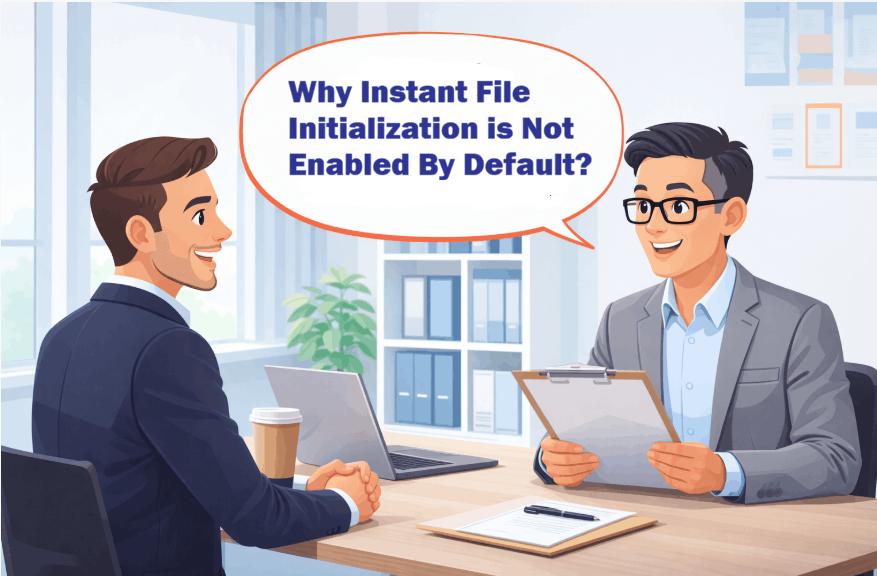
Why Instant File Initialization Is Not Enabled By Default

I have already explained What is IFI and few possible interview questions in What is Instant File Initialization? SQL DBA Interview Q & A . Please read and come back to this for better understanding.

Now you may think that since IFI significantly improves performance, the system should enable it by default. Let’s understand why it is not so.

One Liner Answer:

By default, SQL Server does not enable IFI mainly to prevent security issues and the risk of exposing deleted/wrong data.

Next obvious question would be “Could you please explain the risk?”

Answer with Explanation:

IFI is not enabled by default because when users delete data, the Free Space Management system in the operating system does not physically delete the data. Rather it marks the space(blocks) holding the data as reusable.

Technically marking the storage blocks as “unallocated” in a file system table or bitmap. The actual data remains until overwritten, but the space is immediately available for new files, often using techniques like linked list or bitmaps.

When IFI is not enabled, the system zeros out the page before writing any data. However, when IFI is enabled, the system skips the zero-initialization step and overwrites the deleted disk content only when it writes new data to the files.

As a result, the newly allocated pages may contain previously deleted data, and a slight risk exists that a third-party tool could access the deleted content until another process writes new data to that specific area of the data file.

Additional Information:

This section is only for your knowledge and generally you don’t have to explain in Interview. But helps in case the interviewer asks further details.

While the database file remains attached to the SQL Server instance, the file’s discretionary access control list (DACL) reduces the risk of information disclosure. The DACL allows access only to the SQL Server service account, its service SID, and the local administrator. However, when someone detaches the file, a user or service without the SE_MANAGE_VOLUME_NAME privilege may still be able to access it.

Hope this helps in better understanding and you’ll be able to explain to the Interviewer Why IFI is not enabled by default. You may also like to go through the following for your SQL DBA Interview preparation.

Junior SQL Server DBA Interview Questions and Answers

Junior SQL DBA Interview Question Answers -Part2

How To Identify SQL Server Service Account: SQL DBA Interview Q&A

Junior SQL DBA Interview Questions Answers -Part3

Junior SQL DBA Interview Question Answers: Part 4

What is Instant File Initialization? SQL DBA Interview Q & A

{ Add a Comment }